 Multipify
🎥
Screen & webcam recording
Capture a screen or window, add the webcam, images and text, and move from scene to scene.
- Up to 4K
- Scenes
- Audio mixer
The all-in-one video studio: screen capture and webcam, editing with 3D texts and animated stickers, vertical shorts in one click, export to 4K and live on several platforms at once.
Also available for Mac.
From capture to publication, without juggling between several software.
Capture a screen or window, add the webcam, images and text, and move from scene to scene.
Cut, reorganize and overlay your clips on a clear timeline, with as many video and audio tracks as necessary.
3D relief, neon, gold, chrome, fire, glitch... with 30 animations: typewriter, letter by letter, wave, bounce.
More than 230 animated emojis and ready-to-use badges: Subscribe, Like, Link in organic, Promo, LIVE..
Transform a horizontal video at 9:16 in one click, with safe areas, or cut it into several Shorts.
Play on YouTube, Twitch, Facebook, TikTok, Kick... and keep a local copy of the direct.
Create 3D text GIFs or stickers, with transparent background, for your networks, emails or website.
16 color filters, effects (float, grain, thumbnail, tremor) and more than 35 transitions between your clips.
MP4 H.264 or H.265, MOV, WebM, GIF, MP3, WAV. Preset YouTube, TikTok, Instagram, Facebook, LinkedIn..
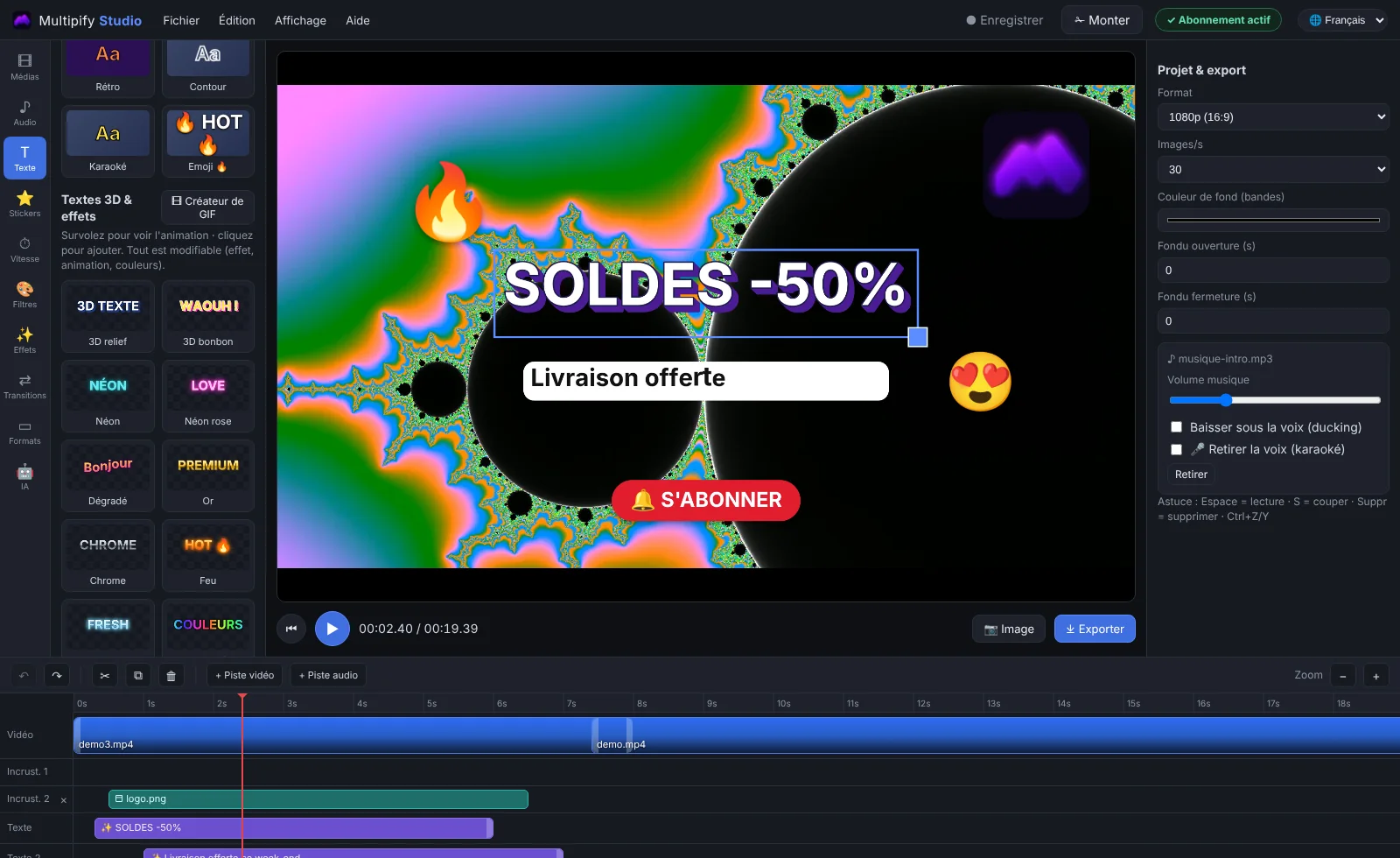
Real captures from Multipify Studio. Click on an image to enlarge.
Install Multipify Studio on Windows or Mac. The 8-day test starts immediately, with all the functions.
Save your screen or import your videos, then add 3D texts, stickers, music and transitions.
Export to the right format for each network, or stream live on multiple platforms at once.
Try for free for 8 days, then choose your formula. No commitment.
The same software and license on Windows and Mac. Updates then install automatically.
.exe installer. Double-click on it and follow the steps.
Download for Windows.dmg disk image. Open it and drag the app into "Applications".
Download for Mac (Apple).dmg disk image for Intel Macs (up to about 2020).
Download for Mac (Intel)If macOS indicates the application "is damaged" : open the app Terminal, paste the line below, press Enter, then restart Multipify Studio.
xattr -cr "/Applications/Multipify Studio.app"
Windows 10 and 11 (64 bits) and macOS 12 or later, on Apple chip Mac (M1 to M4) as on Intel Mac.
Download and install the software: you have 8 days with all functions, without watermark and without credit card. Then choose the monthly or annual formula to continue.
After payment, your key arrives by e-mail. In the software, open Help › Enable the software and enter the key. It is valid on both Windows and Mac.
Yes. A relocation to the same computer automatically resumes your license. On a new computer, simply enter your key: the license is transferred to it.
Yes, they are included in the subscription. The software offers each new version and installs it by keeping your license and projects.
The software blocks at the end of the paid period (after a short grace period). Your projects stay on your computer. A new payment immediately reactivates the same key.
French, English, Spanish, Italian and German. The language of your computer is chosen automatically, and you can change it at any time at the top right.
At any time, from the link received by e-mail or contacting the support. Your license remains active until the end of the paid period.
8 days free, all functions, without credit card.